
Blog | Migration | AWS Transform
Build an executive-ready migration business case with AWS Transform Assessment

By BP Yau, AWS Solutions Architect, Tech Data
8 min read
Organisations often spend weeks consolidating infrastructure inventories, validating assumptions, estimating target costs, and converting technical findings into a business case. Scattered data, incomplete utilization records, unclear licensing positions, and disconnected financial models can delay decisions and reduce confidence in projected savings.
AWS Transform Assessment is an agentic, chat-based assessment experience that analyses IT environments and turns inventory data into right-sizing recommendations, TCO analyses, business-value insights, migration scenarios, and executive-ready deliverables. Teams can investigate results, refine assumptions, and compare options through natural-language conversation instead of repeatedly rebuilding spreadsheets.
In this walkthrough, you use a VMware RVTools export as an example input. You will upload and validate the inventory, define scope and financial assumptions, run and compare assessment scenarios, then generate outputs that support migration decisions. VMware demonstrates the workflow, but the assessment capability is designed for broader infrastructure assessment use cases and multiple supported data sources.
Hands-on workshop | Sydney | Tue 10 Nov
Prefer to learn it hands-on? Join BP at the AWS Transform Partner Workshop: a two-hour guided lab at the AWS Sydney office on Tuesday 10 November, 2–4pm AEDT.
Prerequisites
- Access to an AWS Transform workspace and a migration job with the appropriate permissions.
- A recent RVTools export from the VMware environment. Use either the Excel workbook or a ZIP archive containing the relevant CSV files.
- A basic understanding of the source VMware inventory and the contacts who can clarify missing or unexpected records.
- An approved process for handling infrastructure metadata, including host names, IP addresses, and other potentially sensitive details.
Step 1
Create a current RVTools export
Run RVTools against the vCenter scope that represents the workloads you intend to assess. Export the results in a supported format, then record when and how the file was collected. A current, well-scoped export reduces rework and makes later conversations about inventory completeness more productive.
Before upload, perform a quick quality check:
- Confirm that the export opens successfully and contains virtual machine records.
- Check that the collection scope includes the expected vCenter instances, clusters, hosts, networks, and datastores.
- Remove accidental duplicate exports from the upload package. AWS Transform can de-duplicate records, but clean inputs simplify review.
- Confirm that powered-off or retired systems are handled according to your assessment policy. Do not assume every discovered machine should migrate.
- Store the original export in a controlled project location so that the source record is traceable.
- For the purpose of this blog walkthrough, download the sample RVTools file rvtools_500_servers.xlsx from this link. This file contains mixed Windows and Linux servers, including SQL Server.
Step 2
Create an AWS Transform Assessment job
Sign in to the AWS Transform console and click Service management from the left pane.
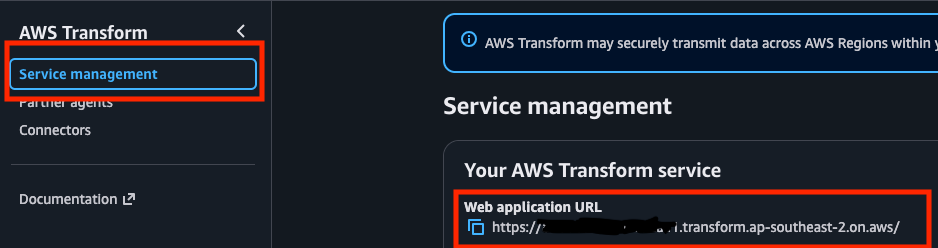
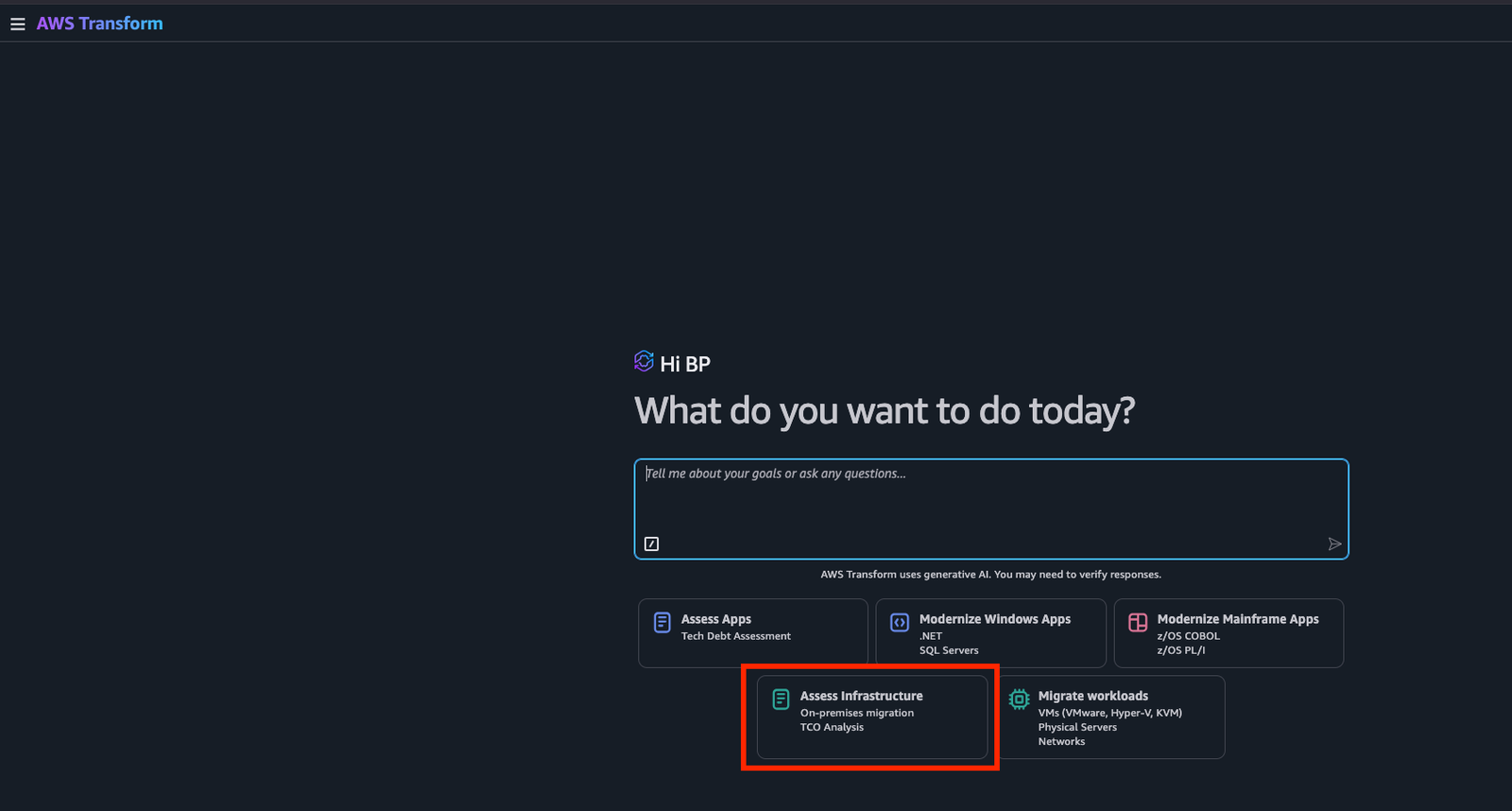
Copy the Web Application URL, open a new browser tab and paste the URL to log in to the AWS Transform Web Application. Once you log in, you will need to create a new workspace to get started. A workspace serves as a permissions boundary, containing other resources such as connectors and jobs. First, select or type Assess Infrastructure in the chat window.
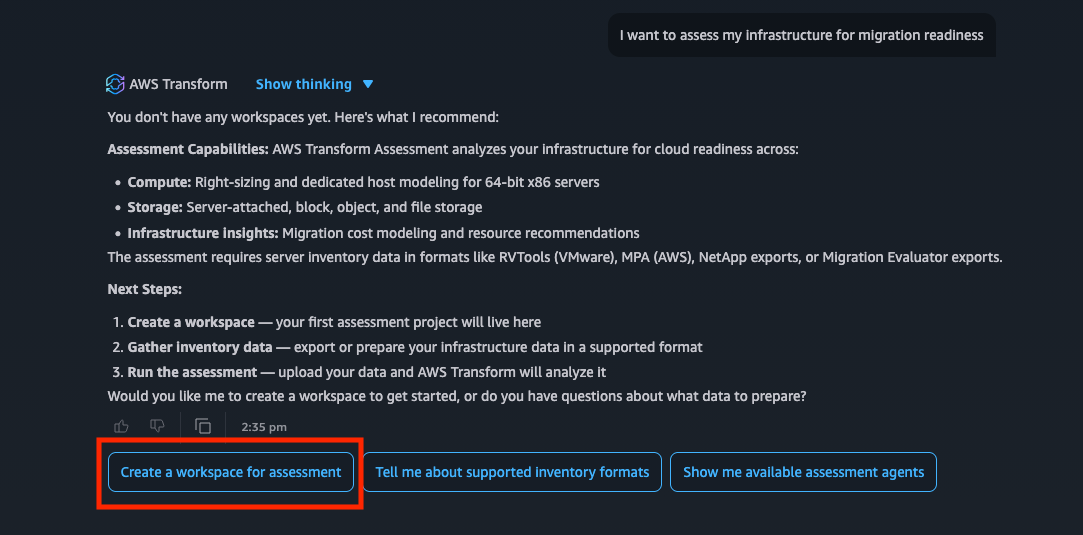
Click Create a workspace for assessment.
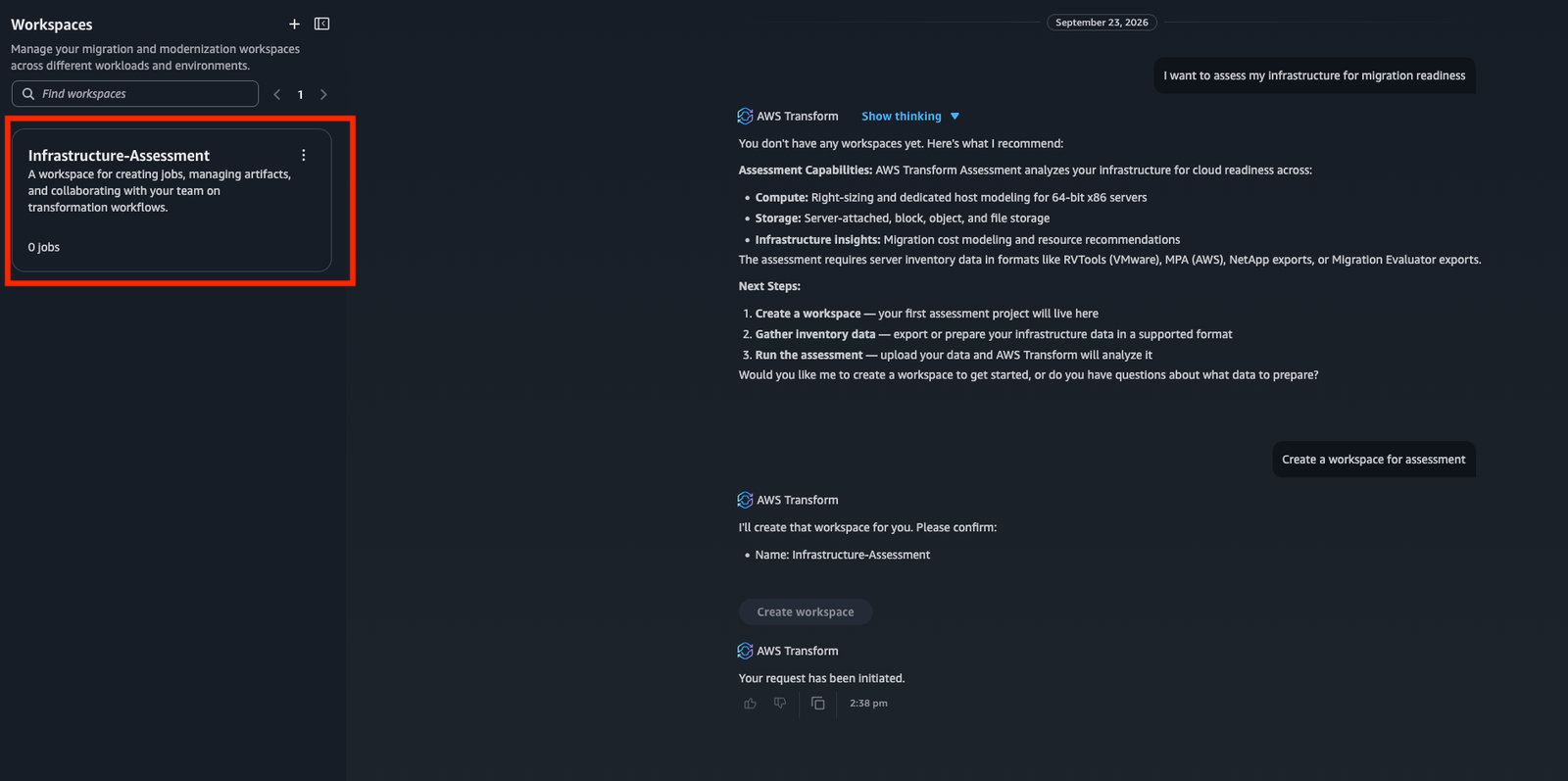
If required, expand the sidebar menu on the left. Click on the workspace you just created to enter it.
Click the Create Job button.
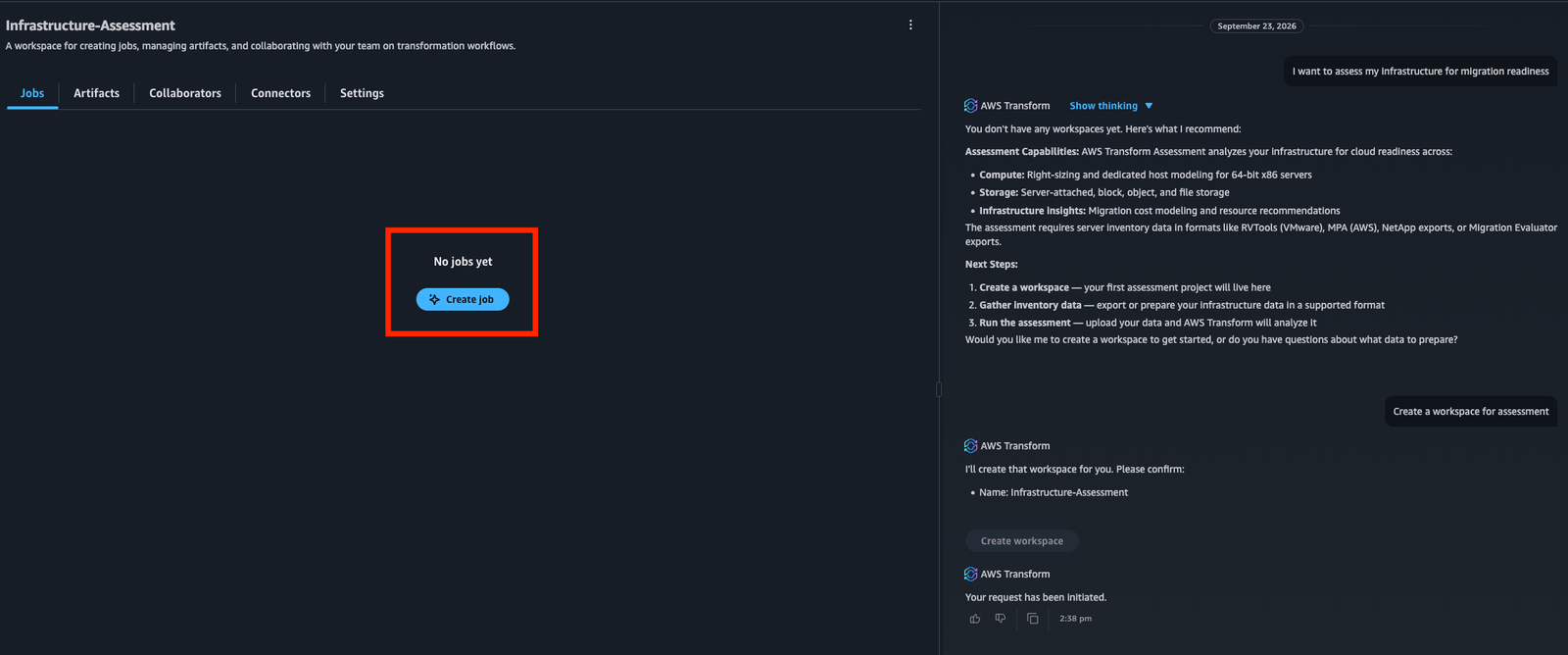
Click Migration on the right side of the screen.
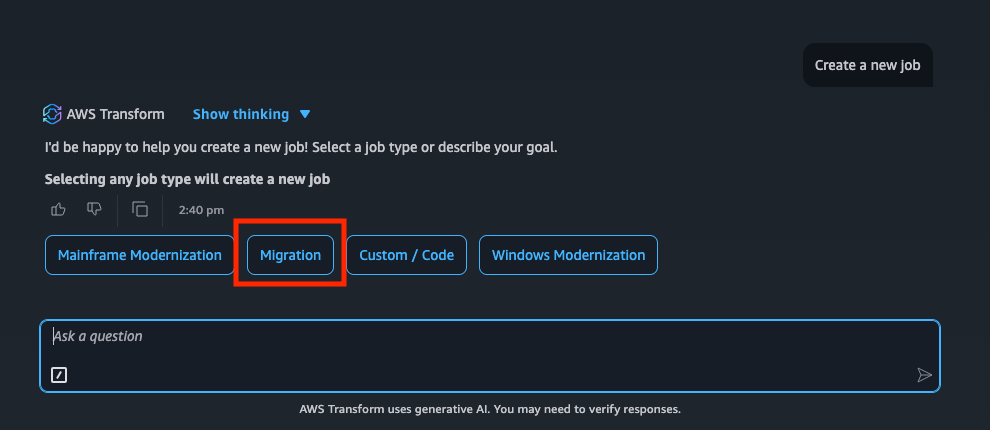
Once you click on Migration, you will see some Migration job options. Click on Migration Assessment.
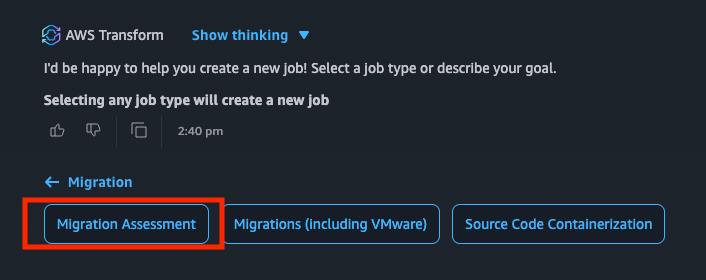
This will start the job with a Running status indication on the top right of the screen. We can now use this job to ingest server inventory data and create an assessment.
Step 3
Upload the RVTools dataset
Upload the RVTools Excel file, or a ZIP file containing the supported CSV exports. Supplementary discovery data should be packaged with the primary server data where applicable. AWS Transform automatically detects the format and structure, parses the file, extracts inventory entities, validates the data, and prepares a summary for review.
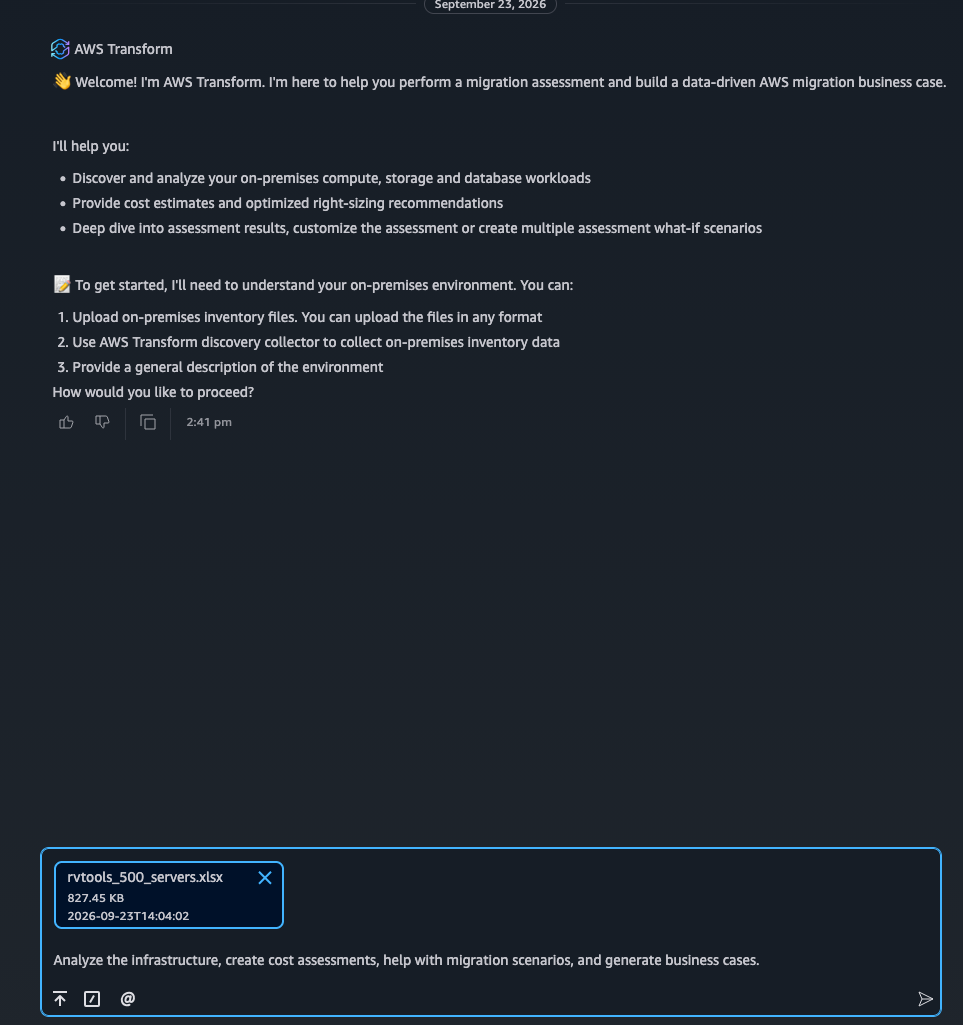
Paste the following prompt into the chat to upload the file and kick off the full analysis:
Prompt
Analyze the infrastructure, create cost assessments, help with migration scenarios, and generate business cases.
Keep the browser session available while the upload and processing steps complete. Processing time varies with the file size and environment complexity. If the service reports an unsupported structure or unreadable file, return to the original export rather than manually changing column names without understanding the expected schema.
Step 4
Review inventory readiness and define scope
After processing completes, review the discovery results and inventory readiness summary by clicking Review Summary in the chat. A pane slides in from the right showing two grouped views:
- Insights — top-line takeaways the agent surfaced from the ingestion (counts, distributions, flags worth your attention)
- Inventory Summary — the structured per-server breakdown the assessment will run against
This pane is your first checkpoint. Skim it before moving on — anything that looks off here is much cheaper to fix now than after the assessment runs. A successful upload means that AWS Transform could process the file; it does not automatically mean the dataset is complete enough for a defensible financial model. Confirm the in-scope population, exclude retired or irrelevant systems, and adjust inventory groupings where needed before configuring the assessment scenario.
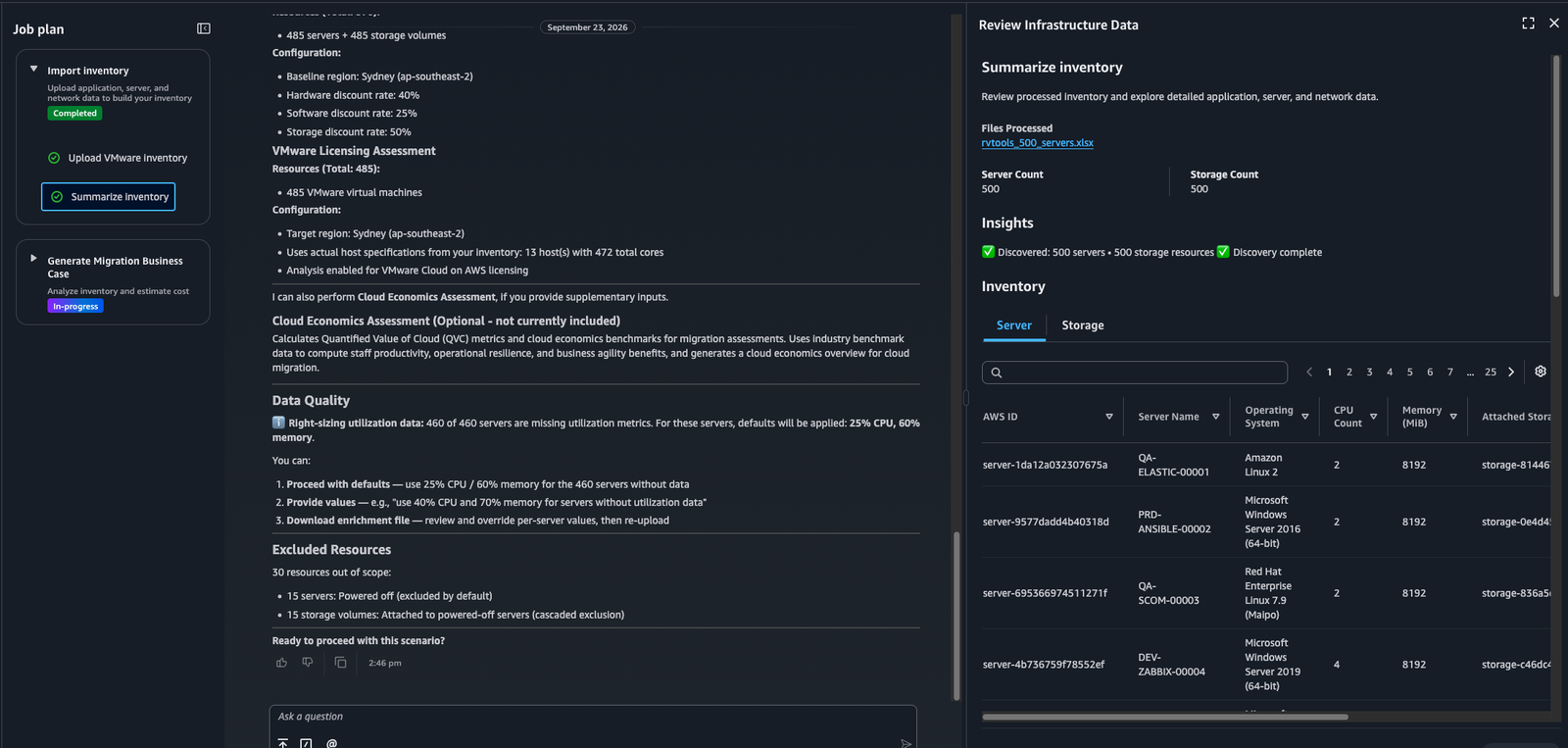
Close the Review Summary pane (top-right corner of the slide-out). Back in the chat, scroll down to find the overall assessment summary the agent posted inline — this is the consolidated, scrollable view you’ll come back to throughout the walkthrough.
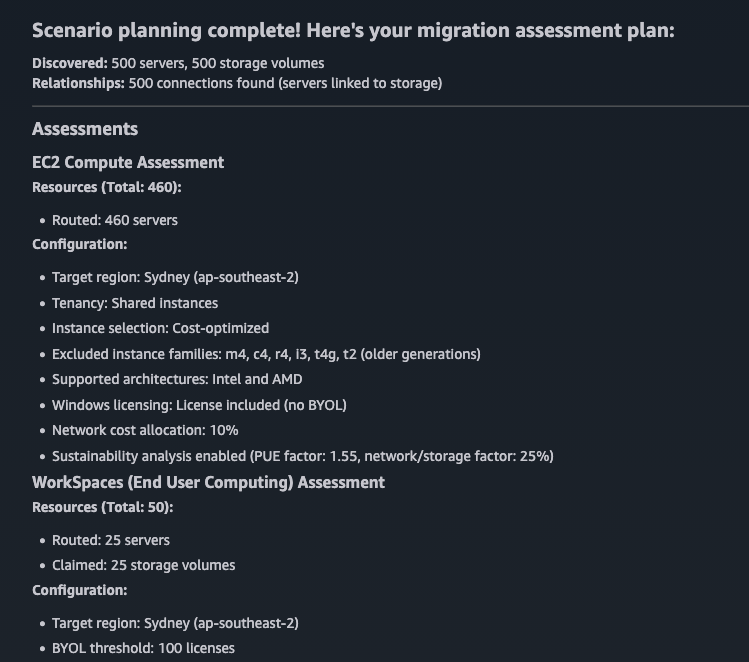
Review the following areas:
- Inventory totals: compare discovered servers and virtual machines with the source team’s expected counts.
- Operating systems: identify unknown, unsupported, or obsolete versions that need remediation or a separate disposition.
- Compute and storage attributes: look for missing CPU, memory, disk, or utilization fields that could affect sizing and cost analysis.
- Network information: confirm that available network metadata is appropriate for the next planning stage.
- Duplicates and validation findings: understand what AWS Transform merged, rejected, or flagged, and whether corrective data is required.
Step 5
Configure the assessment scenario
Configure the pricing and infrastructure assumptions that shape the assessment. Depending on the analysis, these can include target AWS services and Regions, purchasing options, utilization assumptions, growth, migration timing, licensing approaches, and other financial parameters. Record the rationale for material assumptions so reviewers can understand how the model was constructed.
Use the conversational interface to verify scope and expose exceptions. For example:
- How many Windows and Linux servers are included in this scenario?
- Which operating systems or versions are unknown?
- Which records are missing CPU, memory, storage, or network attributes?
- Are there duplicate server records across the uploaded files?
- Which systems appear powered off, inactive, or suitable for exclusion?
Validate important findings and assumptions with infrastructure, application, finance, procurement, and licensing stakeholders. Agentic analysis accelerates the assessment, but the business case should remain grounded in customer context, commercial agreements, architecture standards, security requirements, and operational ownership.
Step 6
Run, refine, and compare assessment scenarios
Run the initial assessment to generate right-sizing recommendations, cost estimates, business-value insights, and migration recommendations by typing Proceed with defaults in the chat.
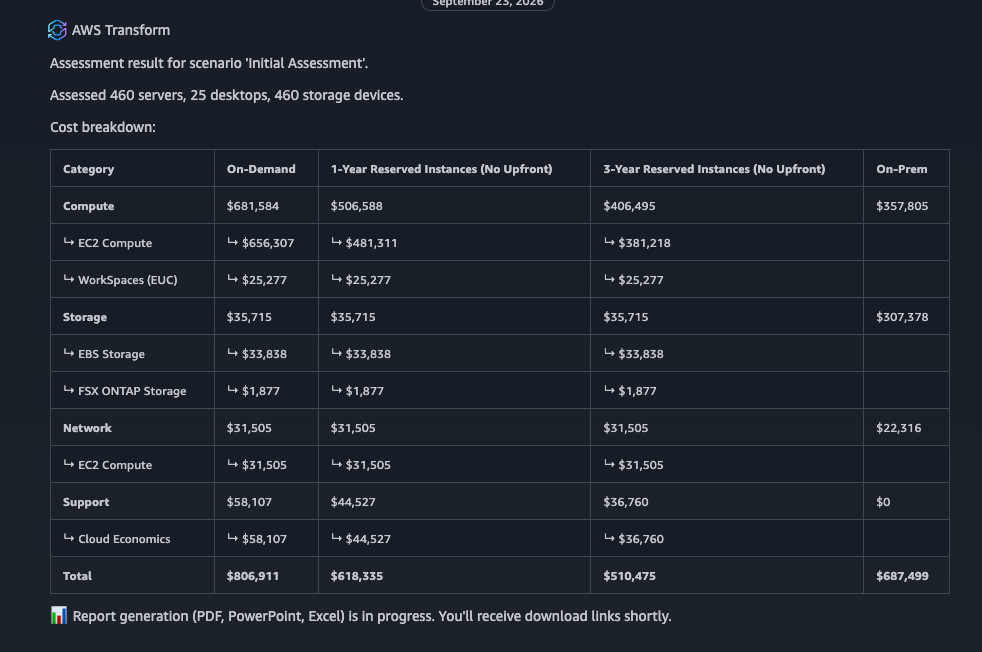
Review the results through chat and refine the model by changing assumptions or scope. Create additional scenarios to compare options side by side, such as alternative Regions, purchasing models, licensing approaches, target architectures, or migration timelines. If the readiness review identifies material inventory issues, correct them at the source where possible and upload updated data to the same assessment job.
Do not wait for a theoretically perfect dataset before beginning useful analysis. Define a minimum evidence threshold and clearly identify assumptions, exclusions, and confidence levels. Early scenarios can support directional discussions, while funding approval and migration execution require progressively stronger technical, utilization, licensing, and business data.
Step 7
Generate executive-ready deliverables and next actions
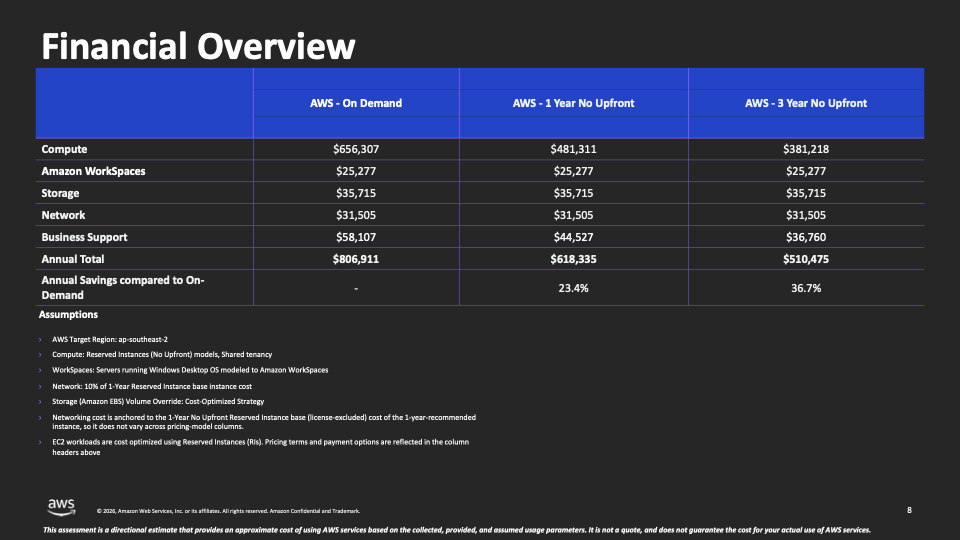
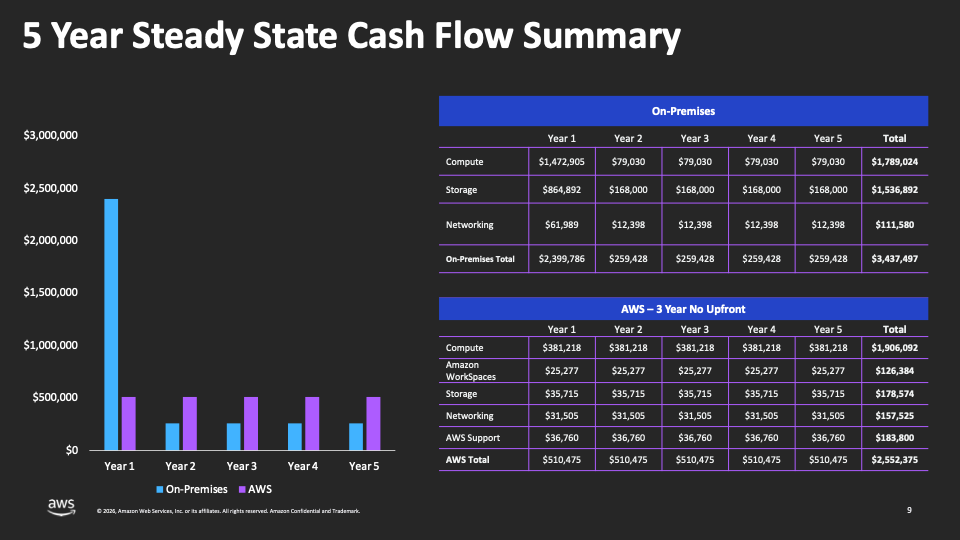
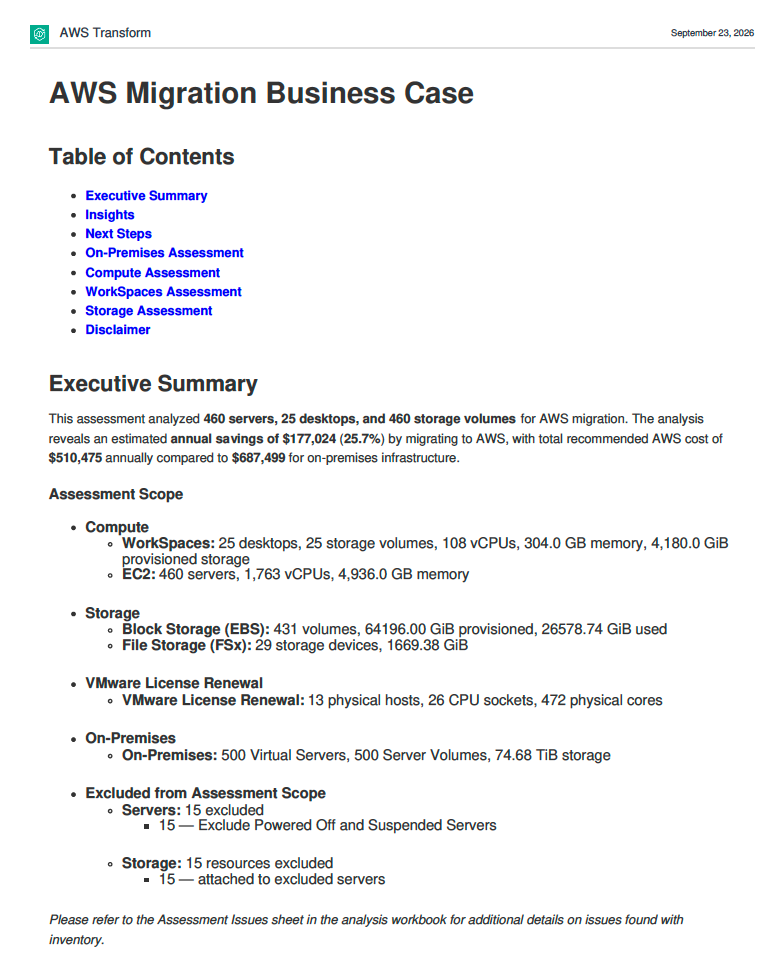
After reviewing and refining the preferred scenario, generate and download assessment deliverables such as an executive presentation and detailed report shown below.
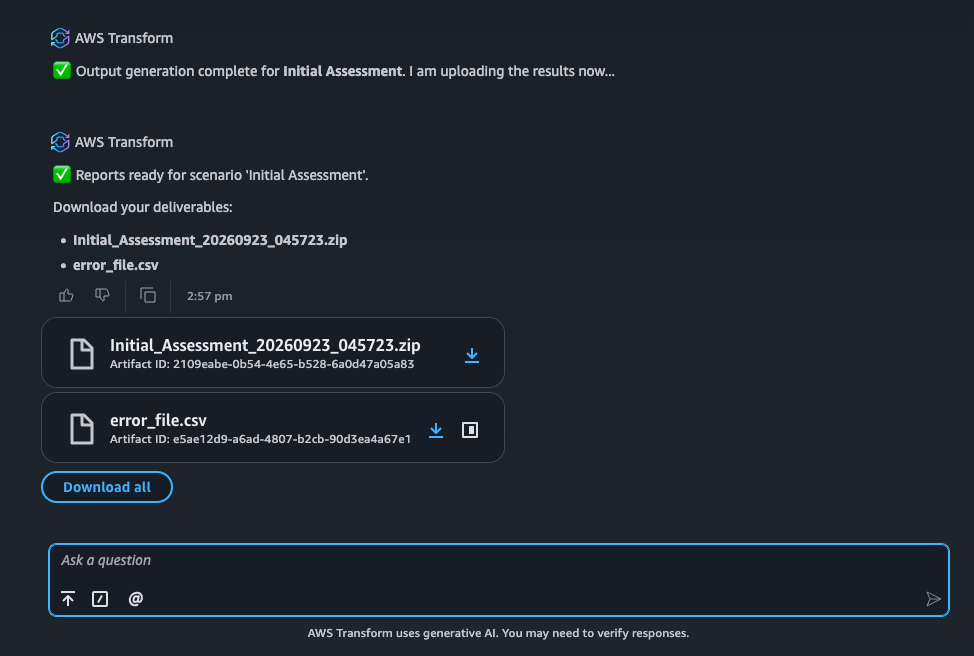
| Artifact | Format | Use for |
|---|---|---|
| Business Case Presentation | PPTX | Executive readout |
| Analysis Workbook | XLSX | Finance/procurement |
| Business Case Report | Customer-facing narrative |
Use these outputs to communicate projected costs, potential savings, right-sizing opportunities, business value, sustainability impact, assumptions, and recommended next steps. The assessment can then inform deeper migration planning, application grouping, wave planning, architecture validation, and execution activities.
RVTools is a useful VMware example, but a decision-ready assessment should also incorporate business criticality, application ownership, dependencies, compliance constraints, maintenance windows, licensing considerations, and modernization objectives.
Troubleshooting common issues
| Issue | Recommended action |
|---|---|
| File is not recognized | Regenerate the export in a supported RVTools Excel format or package the supported CSV files in a ZIP archive. Avoid renaming extensions or altering headers without a documented reason. |
| Inventory count is lower than expected | Check vCenter scope, collection permissions, filters, powered-off systems, and whether multiple environments require separate exports. |
| Key attributes are missing | Correct the source inventory where possible, collect a new export, or enrich the job with additional discovery sources. |
| Sensitive identifiers cannot be shared | Apply an approved anonymization process that preserves analytical fields and maintain a controlled mapping for authorized de-anonymization. |
| Duplicate or stale records appear | Review collection dates and source overlap. Remove obsolete uploads where appropriate, then re-upload current data. |
Summary and next steps
In this walkthrough, you used a VMware RVTools export as an example input for AWS Transform Assessment. You prepared and uploaded inventory data, reviewed readiness and scope, investigated gaps, configured assessment assumptions, ran and compared scenarios, and prepared executive-ready outputs. This approach helps teams turn scattered infrastructure evidence into transparent TCO analyses, business cases, and actionable migration recommendations.
Try AWS Transform for free to explore how an agentic, chat-based assessment experience can accelerate analysis, improve financial transparency, and help stakeholders make confident migration decisions. Review the current AWS Transform pricing and service terms before use, because charges may apply to other AWS services or resources used during assessment, testing, or migration.
For hands-on enablement across APAC, reach out to Tech Data APAC. Our AWS team can help partners and customers prepare inventory data, facilitate assessment and TCO workshops, validate assumptions, compare migration scenarios, develop business cases, and translate AWS Transform Assessment findings into governed migration and modernization roadmaps.
Hands-on workshop | Sydney
Build your VMware migration plan with AWS Transform.
Join Tech Data and AWS for a two-hour, in-person, instructor-led guided lab for partner technical teams. Work through a sample VMware inventory, build a migration business case, plan waves, map dependencies and leave with an actionable migration plan.
When
Tuesday 10 November 2026
2–4pm AEDT
Where
AWS Sydney Office, Room 202
Level 37, 2 Park Street, Sydney
Hosted by
BP Yau, Tech Data
Senay Swinney, AWS
Stay on for drinks and networking from 4–6pm at the Arthouse Hotel, 275 Pitt Street.
About the author

BP Yau
AWS Solutions Architect, Tech Data
BP Yau is an AWS Solutions Architect at Tech Data. He is passionate about helping customers architect big data solutions to process data at scale. He is a former Sr Product Manager and Analytics Specialist Solutions Architect at AWS, where he delivered scalable, high-impact solutions for global enterprises and helped Amazon.com Supply Chain Optimization Technologies migrate its Oracle data warehouse to Amazon Redshift and build its next generation big data analytics platform using AWS technologies.


